1. Hardening the Core: Server and File System Security
Your WordPress installation sits on a server, and its security is paramount.
- Principle of Least Privilege (PoLP): Ensure that file permissions are set correctly. Directories should typically be 755 and files 644. The
wp-config.phpfile, a treasure trove of sensitive information, should ideally be 440 or 400. Restrict write access to prevent unauthorized modifications. - Disable File Editing: Prevent direct editing of theme and plugin files from the WordPress dashboard by adding
define('DISALLOW_FILE_EDIT', true);to yourwp-config.phpfile. This prevents an attacker who gains administrative access from easily injecting malicious code. - Move
wp-config.php: While not always feasible with all hosting environments, moving thewp-config.phpfile one directory above the WordPress root can make it harder for attackers to find and access. - Secure
wp-includes: Consider restricting direct access to thewp-includesfolder via.htaccessrules to prevent execution of PHP files within it, except when required by WordPress. - XML-RPC Disablement (or Hardening): The
xmlrpc.phpfile has historically been a vector for brute-force and DDoS attacks. If you don’t use it (e.g., for remote publishing tools or Jetpack features), disable it completely via.htaccess. If you must use it, implement strong rate limiting and IP whitelisting.
2. Database Fortification: The Heart of Your Data
Your WordPress database holds all your content, user data, and crucial settings.
- Change Default Table Prefix: During installation, change the default
wp_table prefix to something unique and complex (e.g.,wp_xyz123_). This makes SQL injection attacks more difficult by obscuring table names. - Database User Privileges: Ensure the database user assigned to your WordPress site has only the necessary privileges (SELECT, INSERT, UPDATE, DELETE, CREATE, DROP, ALTER) on its specific database, and no global privileges.
- Regular Backups (Offsite and Verified): Implement an automated, reliable backup strategy that includes both your files and database. Crucially, store backups offsite and regularly test restoration to ensure their integrity.
3. Web Application Firewall (WAF): Your First Line of Defense
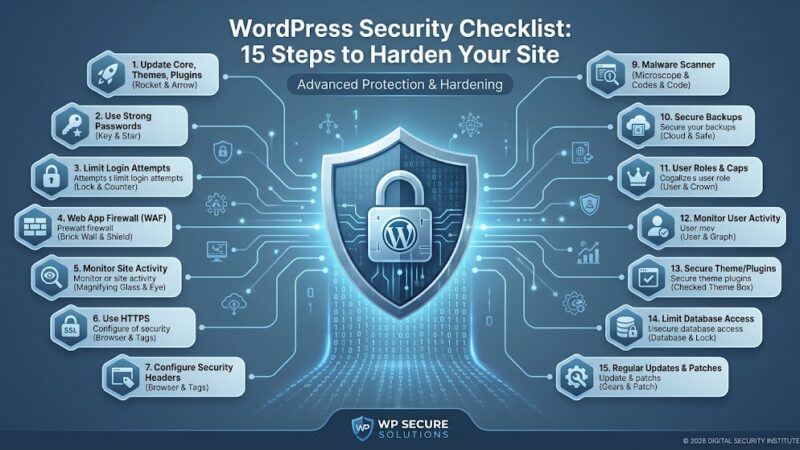
A WAF filters malicious traffic before it ever reaches your WordPress application.
- Cloud-Based WAFs: Services like Cloudflare, Sucuri, or Wordfence (premium) offer robust cloud-based WAFs that can mitigate common attacks such as SQL injection, cross-site scripting (XSS), and brute-force attempts. They also often provide CDN services for performance benefits.
- Server-Level WAFs: Mod_security (for Apache) or Nginx WAF modules can provide another layer of defense at the server level. These require more technical expertise to configure and maintain.
4. Advanced User Management and Authentication
Users are often the weakest link in any security chain.
- Two-Factor Authentication (2FA): Enforce 2FA for all administrative users. This significantly reduces the risk of account compromise even if passwords are stolen.
- Limit Login Attempts: Implement plugins or server-level rules to limit the number of failed login attempts from a single IP address, preventing brute-force attacks.
- Monitor User Activity: Keep an audit log of user logins, logouts, and actions within the WordPress dashboard to detect suspicious behavior.
- Strong Password Policies: Enforce complex password requirements (length, special characters, numbers) and regularly prompt users to change them.
5. Staying Vigilant: Monitoring, Scanning, and Incident Response
Security is an ongoing process, not a one-time setup.
- Malware Scanning: Regularly scan your website files and database for malware, backdoors, and rootkits using dedicated security plugins (e.g., Wordfence, Sucuri) or external scanning services.
- File Integrity Monitoring (FIM): Monitor critical WordPress files for unauthorized changes. An unexpected change could indicate a compromise.
- Security Headers: Implement HTTP security headers like Content Security Policy (CSP), X-XSS-Protection, X-Content-Type-Options, and Strict-Transport-Security (HSTS) to mitigate various client-side attacks.
- Security Logging: Configure your server and WordPress to log security-relevant events. Centralize logs for easier analysis.
- Have an Incident Response Plan: Know exactly what steps to take if your site is compromised. This includes isolating the site, cleaning malware, restoring from backup, identifying the vulnerability, and notifying relevant parties.
6. Secure Development Practices
If you’re developing custom themes or plugins, security must be baked in from the start.
- Sanitize and Validate All User Input: Never trust user input. Sanitize data before storing it and validate it before using it in queries or displaying it.
- Use Nonces: Implement WordPress Nonces (Number Used Once) for all forms and actions to prevent CSRF (Cross-Site Request Forgery) attacks.
- Principle of Least Privilege in Code: Write code that only performs necessary actions and requests the minimum required permissions.
- Stay Updated with Security Best Practices: Regularly review OWASP Top 10 vulnerabilities and ensure your code addresses them.