As a WordPress developer, you’ve likely encountered a situation where you wanted to modify or extend the functionality of a theme or plugin, but didn’t know where to start. This is where WordPress hooks come in – a powerful tool that allows you to tap into the core functionality of WordPress and make customized changes. However, understanding how to use hooks can be overwhelming, especially for beginners. In this article, we’ll delve into the world of WordPress hooks, exploring the difference between actions and filters, and providing step-by-step solutions for using them effectively.
Introduction to WordPress Hooks
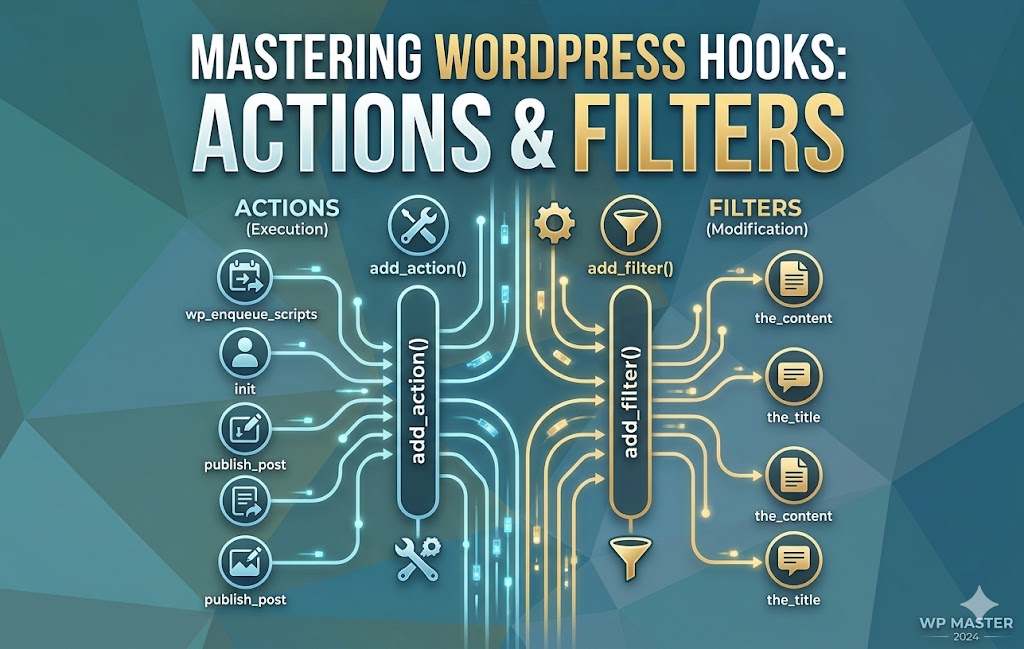
WordPress hooks are essentially a way for developers to interact with the core WordPress code, allowing them to modify or extend its functionality. There are two types of hooks: actions and filters. Actions are used to execute a function at a specific point in the WordPress code, while filters are used to modify data before it’s displayed or used. Both types of hooks are essential for creating customized WordPress solutions.
Actions
Actions are used to execute a function at a specific point in the WordPress code. They’re typically used to add new functionality or modify existing behavior. For example, you might use an action to add a custom meta box to the WordPress editor, or to modify the way WordPress handles user registration. Actions are usually triggered by a specific event, such as when a post is published or when a user logs in.
add_action( 'wp_head', 'my_custom_function' );
function my_custom_function() {
    // Code to be executed
}
Filters
Filters are used to modify data before it’s displayed or used. They’re typically used to change the way WordPress displays data, such as modifying the text of a post or changing the way images are displayed. Filters are usually applied to a specific piece of data, such as the title of a post or the content of a comment.
add_filter( 'the_title', 'my_custom_filter' );
function my_custom_filter( $title ) {
    // Code to modify the title
    return $title;
}
What Causes This Issue
One of the most common issues with using WordPress hooks is not understanding how they work or where to use them. This can lead to confusion and frustration, especially for beginners. Some common root causes of issues with WordPress hooks include:
- Not understanding the difference between actions and filters
- Not using the correct hook or function
- Not properly registering the hook or function
- Not testing the hook or function thoroughly
Step-by-Step Solutions
To use WordPress hooks effectively, follow these step-by-step solutions:
- Identify the hook you want to use: Look for the hook that corresponds to the functionality you want to modify or extend. You can find a list of available hooks in the WordPress Codex.
- Register the hook: Use the
add_actionoradd_filterfunction to register the hook. Make sure to use the correct hook and function. - Define the function: Create a function that will be executed when the hook is triggered. Make sure the function is properly defined and registered.
- Test the hook: Test the hook thoroughly to make sure it’s working as expected. Use debugging tools such as the WordPress debug log to help identify any issues.
Prevention Tips
To avoid issues with WordPress hooks, follow these prevention tips:
- Use the correct hook and function: Make sure you’re using the correct hook and function for the functionality you want to modify or extend.
- Test thoroughly: Test the hook thoroughly to make sure it’s working as expected.
- Use debugging tools: Use debugging tools such as the WordPress debug log to help identify any issues.
- Keep your code organized: Keep your code organized and well-documented to make it easier to understand and maintain.
Conclusion
WordPress hooks are a powerful tool for extending and customizing WordPress functionality. By understanding the difference between actions and filters, and following the step-by-step solutions outlined in this article, you can use WordPress hooks to create customized solutions for your website. Remember to always test your code thoroughly and use debugging tools to help identify any issues. With practice and patience, you’ll become proficient in using WordPress hooks to create powerful and customized WordPress solutions.