If you have spent any amount of time customizing a WordPress theme, building a plugin, or attempting to modify the behavior of a third-party extension, you have inevitably encountered the concept of WordPress hooks. You might have found yourself staring at a snippet on Stack Overflow or GitHub, copying lines of add_action() or add_filter() into your theme’s functions.php file, praying that it fixes your broken layout or successfully alters a WooCommerce checkout field.
However, copying and pasting code without understanding the underlying mechanics often leads to subtle bugs, broken templates, whitescreens of death, or unexpected side effects. One minute your code works perfectly, and the next, your custom query breaks the main WordPress admin dashboard, or your filter strips all HTML tags from your blog posts because you forgot to return a variable.
In this comprehensive guide, we are going to demystify WordPress hooks from the ground up. Whether you are a beginner stepping beyond basic CSS and HTML or an intermediate developer looking to solidify your understanding of event-driven architecture in PHP, this article will serve as your definitive manual. We will explore how actions and filters work, examine their internal mechanics inside the WordPress core, walk through practical step-by-step code implementations, diagnose common root causes of hook-related failures, and provide a set of battle-tested best practices to ensure your code remains clean, performant, and maintainable.
What Are WordPress Hooks? The Architectural Foundation
At its core, WordPress is built upon an event-driven design pattern called the Observer Pattern. In traditional procedural programming, code executes linearly from top to bottom. If you want to modify how a core feature works, you would theoretically have to open the core file and edit the code directly. However, in open-source Content Management Systems (CMS), modifying core files—often referred to as “hacking core”—is a cardinal sin. The moment WordPress releases a security patch or automated update, all of your custom edits will be overwritten and permanently lost.
To solve this fundamental challenge, WordPress implements an extensible system known as Hooks. Hooks are designated execution points embedded throughout the WordPress core source code, themes, and plugins. They allow developers to “hook into” the execution flow at specific moments during a HTTP request lifecycle and execute custom PHP code without modifying a single line of core files.
When WordPress processes an incoming request, it loads its core files, boots up active plugins, initialises the active theme, processes the global query, and renders the requested template. Throughout this boot process, WordPress continually triggers events. Hooks allow your code to listen for these events, intervene, perform custom operations, or modify data in real-time before returning execution back to the system.
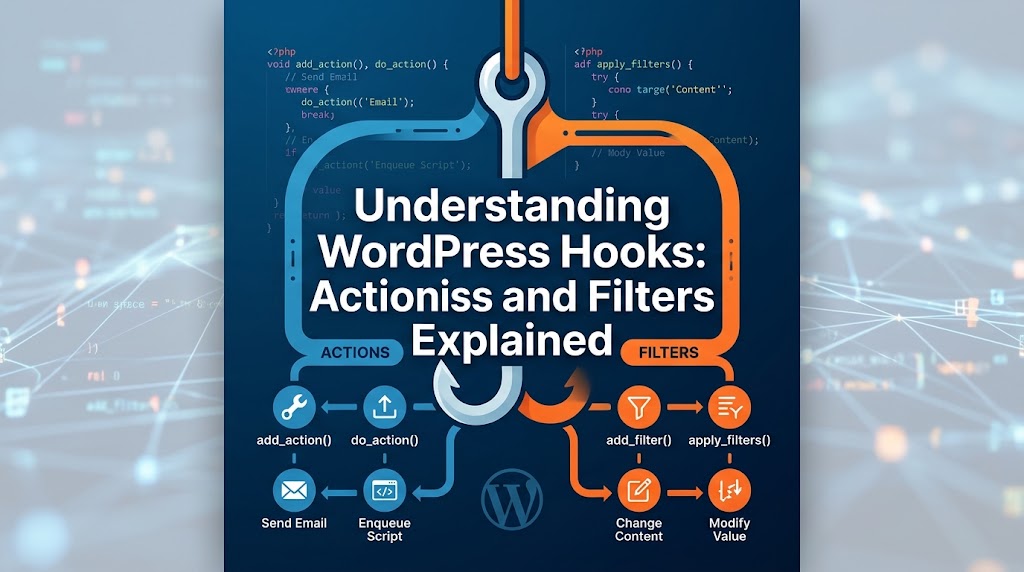
WordPress provides two distinct types of hooks:
- Actions (Action Hooks): Used to execute custom functionality at a specific point in execution. Actions do not expect you to return a value; they perform tasks like saving data, sending emails, or echoing HTML into the page response.
- Filters (Filter Hooks): Used to intercept, modify, and pass along data as it is being processed by WordPress. Filters must always receive data, transform it, and return it back to the system.
Understanding WordPress Actions in Depth
An Action in WordPress is an event trigger. Think of an Action hook as a broadcast announcement made by WordPress: “Hey, I am currently initializing the site!” or “I just published a new post!” or “I am about to render the head section of the HTML document!”
When WordPress fires an action hook, it pauses its execution and checks a global registry to see if any developer has registered custom functions (known as callbacks) for that specific action. If callbacks exist, WordPress executes them in order of priority and then resumes its normal processing flow.
How WordPress Triggers an Action: do_action()
Inside the WordPress core codebase (or within high-quality third-party plugins), an action hook is defined using the PHP function do_action(). Here is what the basic signature looks like:
do_action( string $hook_name, mixed $arg = '' );For example, inside the header file of a standard theme or core template engine, you will find the classic wp_head action call:
// Inside core/theme header file
do_action( 'wp_head' );
When the execution engine hits this line, WordPress triggers every single function attached to the wp_head hook.
How You Hook into an Action: add_action()
To attach your custom function to an action hook, you use the add_action() function. The syntax for registering an action callback requires up to four parameters:
add_action(
    string $hook_name,
    callable $callback_to_run,
    int $priority = 10,
    int $accepted_args = 1
);
Let’s dissect each parameter to understand its role:
$hook_name: (Required) The exact string name of the action hook you want to target (e.g.,'wp_enqueue_scripts','init','save_post').$callback_to_run: (Required) The name of the custom PHP function, closure, or class method you want to execute when the hook fires.$priority: (Optional) An integer that determines the execution order. Default is10. Lower numbers run earlier; higher numbers run later.$accepted_args: (Optional) The number of arguments your callback function expects to receive from the action trigger. Default is1.
Real-World Action Example: Enqueuing Stylesheets and Scripts
A common mistake made by new WordPress developers is attempting to output script tags directly in the template files or echoing them directly inside functions.php. The correct, conflict-free method in WordPress is hooking into the wp_enqueue_scripts action hook:
/**
 * Enqueue custom theme styles and scripts cleanly.
 */
function my_theme_enqueue_assets() {
    // Enqueue stylesheet
    wp_enqueue_style(
        'my-custom-style',
        get_template_directory_uri() . '/css/main.css',
        array(),
        '1.0.0'
    );

    // Enqueue JavaScript file
    wp_enqueue_script(
        'my-custom-script',
        get_template_directory_uri() . '/js/app.js',
        array( 'jquery' ),
        '1.0.0',
        true
    );
}
add_action( 'wp_enqueue_scripts', 'my_theme_enqueue_assets' );
In this example, WordPress triggers the wp_enqueue_scripts action during the standard template initialization. Our custom callback function, my_theme_enqueue_assets(), catches the event, adds our custom CSS and JS files to the enqueue queue, and allows WordPress to output them cleanly in the HTML head and footer.
Understanding WordPress Filters in Depth
Where Actions are meant for executing code and doing “work” (such as inserting data into the database or enqueuing files), Filters are designed exclusively for modifying data before it is displayed, stored, or processed further by the application.
Think of a Filter hook as an assembly line worker. WordPress takes a piece of data—such as the content of a blog post, a page title, or an email address—and passes it down a conveyer belt. Each filter registered to that hook takes the incoming data, alters it in some way, and passes the modified version down to the next worker inline.
The Cardinal Rule of Filters: A filter callback function MUST ALWAYS return a value. If you forget to include a return statement inside a filter callback, the variable will be wiped out and replaced with NULL, breaking site output or causing fatal PHP errors.
How WordPress Applies a Filter: apply_filters()
Inside core files or plugins, WordPress initializes a filter hook using the function apply_filters(). The syntax looks like this:
$value = apply_filters( string $hook_name, mixed $value, mixed ...$args );For instance, when WordPress prepares to print a post’s main content area on the screen via the the_content() template tag, it passes the raw database text through the the_content filter like this:
// Inside WordPress core (wp-includes/post-template.php)
$content = get_the_content();
$content = apply_filters( 'the_content', $content );
echo $content;
How You Intercept a Filter: add_filter()
To attach a custom callback to a filter hook, you use add_filter(). The signature is identical in structure to add_action():
add_filter(
    string $hook_name,
    callable $callback_to_run,
    int $priority = 10,
    int $accepted_args = 1
);
Real-World Filter Example: Appending Custom HTML to Post Content
Suppose you want to automatically add a custom call-to-action (CTA) box at the bottom of every single blog post on your website. Instead of editing single post template files across your theme, you can intercept the content using the_content filter:
/**
 * Append a custom call-to-action box to single post contents.
 *
 * @param string $content The original post content.
 * @return string The modified post content.
 */
function my_custom_author_signature( $content ) {
    // Only target main single post views to avoid breaking archive pages or feeds
    if ( is_single() && is_main_query() ) {
        $custom_box  = '<div class="custom-post-notice">';
        $custom_box .= '<p><strong>Enjoyed this article?</strong> Subscribe to our newsletter for more technical insights!</p>';
        $custom_box .= '</div>';

        // Concatenate custom HTML to the existing content
        $content .= $custom_box;
    }

    // ALWAYS return the filtered data!
    return $content;
}
add_filter( 'the_content', 'my_custom_author_signature' );
Notice what happens here: WordPress passes the original post string as the $content variable into our function. We append our notice box HTML string to the end of $content, and then return the updated string. If we failed to include return $content; at the bottom, the entire body text of every article on the site would vanish instantly.
Actions vs. Filters: Key Differences Matrix
Because the functions add_action() and add_filter() share identical parameters and underlying code architecture inside WordPress core, developers frequently confuse the two concepts. In fact, under the hood, add_action() is literally an alias wrapper that calls add_filter() inside wp-includes/plugin.php!
However, conceptually and functionally, they serve two fundamentally different operational goals. The table below outlines how you can quickly identify which one to use when writing custom code:
- Primary Objective:
- Action: Executes custom tasks, triggers external events, or outputs direct code at a precise moment during execution.
- Filter: Accepts input data, modifies or transforms the data, and returns the newly structured data back.
- Return Requirement:
- Action: Does NOT return a value. Any return value is ignored by
do_action(). - Filter: MUST return a modified (or untouched) value. Failing to return data corrupts execution.
- Action: Does NOT return a value. Any return value is ignored by
- Trigger Mechanism:
- Action: Invoked in core/plugins using
do_action( 'hook_name', $args... ). - Filter: Invoked in core/plugins using
apply_filters( 'hook_name', $value, $args... ).
- Action: Invoked in core/plugins using
- Typical Use Cases:
- Action: Registering Custom Post Types, enqueuing scripts/styles, sending transactional emails, logging events, inserting rows into custom database tables.
- Filter: Altering excerpt lengths, modifying query parameters, translating dynamic text strings, modifying email subject lines, adding HTML attributes to images.
Deep Dive: Hook Priorities, Arguments, and Callbacks
Mastering WordPress hooks requires a solid grasp of how WordPress manages execution ordering, variable passing, and dynamic PHP invocation methods.
1. Understanding Priority Execution Order
Multiple plugins and themes often hook into the exact same action or filter hook. For instance, five different plugins on your site might register callbacks to the init action. Which function executes first?
This is where the third parameter of add_action() or add_filter()—priority—comes into play. Priority is specified as an integer value, defaulting to 10 if left undefined.
- Functions with lower priority numbers run earlier (e.g., priority
5runs before priority10). - Functions with higher priority numbers run later (e.g., priority
20runs after priority10). - If two functions are assigned the exact same priority, they execute in the order in which they were registered during the request.
// Runs FIRST (Priority 5)
add_action( 'init', 'my_early_setup_function', 5 );

// Runs SECOND (Default Priority 10)
add_action( 'init', 'my_standard_setup_function' );

// Runs THIRD (Priority 99 - Overrides earlier work)
add_action( 'init', 'my_late_cleanup_function', 99 );
Priorities are extremely powerful when resolving conflicts between third-party plugins. If a page builder plugin alters page titles at priority 10, and you want to override the page builder’s changes in your child theme, you can attach your filter at priority 20 or higher.
2. Passing Multiple Arguments ($accepted_args)
When WordPress calls do_action() or apply_filters(), it can pass multiple pieces of contextual information to the hooked functions. However, PHP needs to know in advance how many parameters your callback function expects to accept.
By default, WordPress only passes the first argument to your callback. If a hook offers three contextual variables, you must explicitly set the 4th parameter of add_action() or add_filter()—$accepted_args—to 3.
Consider the core action hook save_post, which passes three arguments: the post ID, the full post object, and a boolean indicating whether the post is being updated:
// Core trigger inside WordPress:
// do_action( 'save_post', $post_id, $post, $update );

/**
 * Custom function that processes post saves.
 */
function my_custom_save_handler( $post_id, $post, $update ) {
    // If this is an autosave or draft revision, do nothing
    if ( wp_is_post_revision( $post_id ) || wp_is_post_autosave( $post_id ) ) {
        return;
    }

    // Perform operations with access to full $post data
    if ( $update && $post->post_type === 'product' ) {
        // Custom logic here
    }
}

// Notice the final parameter '3' telling WP to pass all 3 arguments!
add_action( 'save_post', 'my_custom_save_handler', 10, 3 );
If you forgot to set the fourth argument to 3 in add_action(), PHP would throw a fatal ArgumentCountError when trying to supply $post and $update to your function signature.
3. Callback Variations: Functions, Anonymous Closures, and OOP Classes
In modern PHP development, callbacks are not limited to simple procedural function strings. WordPress supports all valid PHP callable formats:
A. Anonymous Functions / Closures: Useful for quick, lightweight scripts or unit tests that don’t need to be unhooked later.
add_filter( 'excerpt_length', function( $length ) {
    return 20; // Shorten excerpt to 20 words
}, 10 );
B. Class Methods (Object-Oriented Syntax): When writing custom plugins using Object-Oriented Programming (OOP), callbacks are passed using an array structure containing the object instance (or class name for static methods) and the method string.
class My_Custom_Plugin {

    public function __construct() {
        // Instantiate hook using an object reference ($this)
        add_action( 'init', array( $this, 'initialize_plugin' ) );

        // Hooking a static class method
        add_filter( 'the_title', array( __CLASS__, 'modify_title' ) );
    }

    public function initialize_plugin() {
        // Initialization code
    }

    public static function modify_title( $title ) {
        return 'Filtered: ' . $title;
    }
}

$my_plugin = new My_Custom_Plugin();
4. Removing Hooks: remove_action() and remove_filter()
Sometimes you need to undo functionality added by WordPress core, a parent theme, or a third-party plugin. WordPress provides remove_action() and remove_filter() to accomplish this.
To successfully unhook a callback, your remove_action() statement must match the exact target function name, hook name, and priority level used when the callback was original registered.
/**
 * Remove default WordPress meta tags from header.
 */
function my_remove_unwanted_core_features() {
    // Priority must match original add_action priority (default 10)
    remove_action( 'wp_head', 'wp_generator' );
}
add_action( 'init', 'my_remove_unwanted_core_features' );
Important Note on Execution Timing: You cannot remove a hook before it has been added! Make sure your remove_action() call executes on a hook that fires after the target plugin has registered its actions (such as on init or wp_loaded).
Step-by-Step Practical Solutions: Real-World Scenarios
Now that we have covered the theory behind WordPress hooks, let’s explore three practical step-by-step developer tasks that demonstrate the full power of actions and filters in production environments.
Scenario 1: Modifying the Main WordPress Database Query via pre_get_posts
Problem: You want to display 15 custom posts per page on category archive pages instead of the default setting configured in Settings -> Reading, without running a secondary WP_Query loop that destroys page load performance.
Solution: Hook into the pre_get_posts action hook. This hook fires after the main query variable object is created, but before the actual SQL query is sent to the MySQL database server.
/**
 * Customise category archive post counts dynamically.
 *
 * @param WP_Query $query The current WP_Query instance (passed by reference).
 */
function my_custom_category_query_limits( $query ) {
    // Safety Checks:
    // 1. Never alter queries in the WP Admin backend!
    // 2. Ensure we are ONLY altering the main loop query, not widgets or sidebars.
    if ( ! is_admin() && $query->is_main_query() ) {

        // Target only category archive templates
        if ( $query->is_category() ) {
            // Change posts per page limit to 15
            $query->set( 'posts_per_page', 15 );

            // Exclude specific category ID dynamically if needed
            $query->set( 'category__not_in', array( 42 ) );
        }
    }
}
add_action( 'pre_get_posts', 'my_custom_category_query_limits' );
Scenario 2: Creating Your Own Custom Hooks inside Theme/Plugin Architecture
Problem: You are building a custom e-commerce plugin or custom theme layout, and you want to allow other developers (or child themes) to inject custom HTML content or filter values inside your custom component.
Solution: Embed do_action() and apply_filters() inside your custom code files.
/**
 * Template file inside your custom theme/plugin.
 */
function render_custom_user_profile_card( $user_id ) {
    $user_data = get_userdata( $user_id );

    // Create a filterable display name allow third parties to modify
    $display_name = apply_filters( 'my_plugin_user_display_name', $user_data->display_name, $user_id );

    echo '<div class="user-card">';
    echo '<h3>' . esc_html( $display_name ) . '</h3>';

    // Provide an action hook for developers to insert content before the bio
    do_action( 'my_plugin_before_user_bio', $user_id );

    echo '<p class="user-bio">' . esc_html( $user_data->description ) . '</p>';

    // Provide another hook after the bio
    do_action( 'my_plugin_after_user_bio', $user_id );

    echo '</div>';
}
Now, any child theme developer can easily hook into my_plugin_user_display_name to append custom VIP badges to names, or hook into my_plugin_after_user_bio to output social media icons without editing your core plugin file!
Scenario 3: Intercepting and Sanitizing Custom Meta Input
Problem: You are saving custom metadata associated with blog post updates, but you need to validate and filter the data dynamically before it reaches the database table.
Solution: Combine the save_post action hook with appropriate PHP array checks and sanitization wrappers.
/**
 * Save custom metabox data safely.
 */
function my_save_custom_meta_box_data( $post_id ) {
    // Verify nonce for security
    if ( ! isset( $_POST['my_meta_box_nonce'] ) || ! wp_verify_nonce( $_POST['my_meta_box_nonce'], 'my_save_meta_action' ) ) {
        return;
    }

    // Check autosave
    if ( defined( 'DOING_AUTOSAVE' ) && DOING_AUTOSAVE ) {
        return;
    }

    // Check user permissions
    if ( ! current_user_can( 'edit_post', $post_id ) ) {
        return;
    }

    // Sanitize and save custom field value
    if ( isset( $_POST['my_custom_subtitle_field'] ) ) {
        $sanitized_value = sanitize_text_field( $_POST['my_custom_subtitle_field'] );
        update_post_meta( $post_id, '_my_custom_subtitle', $sanitized_value );
    }
}
add_action( 'save_post', 'my_save_custom_meta_box_data' );
What Causes Issues with WordPress Hooks? (Root Causes Explained)
When custom hooks fail or trigger unexpected behavior, identifying the culprit requires an understanding of common pitfalls. Here are the most frequent root causes behind hook failures:
1. The Missing Return Statement in Filters
By far the most common bug encountered by developers transition between actions and filters is omitting the return statement. If a filter function executes code, logs output, or echoes data directly instead of returning the variable, the incoming data stream gets destroyed. This results in blank screens, disappearing post titles, broken navigation menus, or empty database fields.
2. Infinite Recursion Loops (Stack Overflow)
An infinite loop occurs when a hook callback function inadvertently triggers the exact same hook that called it. A classic example is calling wp_update_post() inside a function attached to the save_post action hook. Calling wp_update_post() causes WordPress to trigger save_post again, which calls your function again, creating an infinite loop until the PHP memory limit is exhausted and a fatal server error crashes the page.
3. Incorrect Hook Timing and Execution Lifecycle
WordPress loads its environment in a strict chronological sequence during an HTTP request. Attempting to execute code before WordPress has loaded the required API functions will trigger fatal errors.
For example, attempting to call wp_get_current_user() inside your main plugin file on initial file execution—before the plugins_loaded or init action hooks have fired—will fail because user session authentication logic has not booted up yet.
4. Argument Count Mismatches ($accepted_args)
If a hook passes multiple arguments (e.g., $post_id, $post, $update) and your custom callback signature expects three arguments, but you omitted the 4th parameter in add_action() (leaving it at the default value of 1), PHP will throw an error stating that required arguments were missing when the callback was invoked.
5. Unintentional Global Scope Pollution or Global Query Corruption
Modifying query parameters on the pre_get_posts hook without checking $query->is_main_query() and !is_admin() will alter every single query running on the site. This causes backend admin dashboard tables, footer navigation menus, sidebars, and custom taxonomy loops to break simultaneously.
How to Debug WordPress Hooks
When tracking down problematic hooks or verifying execution orders, experienced developers rely on several key debugging techniques:
1. Checking Hook Registration with has_action() and has_filter()
You can programmatically verify whether a specific callback function is attached to a hook before attempting to run or remove it:
// Returns false if not registered, or returns integer priority if registered
$priority = has_action( 'wp_head', 'my_custom_script_function' );

if ( false !== $priority ) {
    // Action exists and is attached at priority $priority
}
2. Inspecting Global Hooks using Query Monitor
Rather than manually inspecting global variables in code, install the free developer plugin Query Monitor by John Blackbourn. Query Monitor provides a complete breakdown of every single action and filter fired during the current page request, complete with precise execution priority numbers, attached callback file paths, component sources, and memory consumption.
3. Programmatically Inspecting the $wp_filter Global
If you need to programmatically inspect all callbacks registered to a specific hook during execution, you can log or dump the global $wp_filter array:
global $wp_filter;

// Inspect registered callbacks attached to 'the_content'
if ( isset( $wp_filter['the_content'] ) ) {
    error_log( print_r( $wp_filter['the_content'], true ) );
}
Prevention Tips & Best Practices
To write robust, maintainable, high-performance WordPress themes and plugins, adhere to these battle-tested best practices:
- Always Guard Query Hooks: When using query-level hooks like
pre_get_posts, always enforce safety checks using conditional tags like!is_admin()and$query->is_main_query(). - Prevent Recursion in Save Hooks: When updating post meta or running calculations inside
save_post, unhook your callback temporary prior to invoking standard update methods, or utilize static status flags to prevent infinite loops:// Prevent recursion inside save_post remove_action( 'save_post', 'my_save_handler' ); wp_update_post( $my_post_data ); add_action( 'save_post', 'my_save_handler' ); - Namespace Your Function and Hook Names: Avoid generic hook names like
custom_headeror function names likeadd_styles(). Prefix all custom actions, filters, and functions with a unique vendor prefix (e.g.,my_company_render_header) to eliminate collisions with other plugins. - Document Custom Hooks with PHPDoc: When creating custom hooks using
do_action()orapply_filters()in your codebase, document them cleanly using inline PHPDoc standards so other developers understand expected variable types. - Prefer Early Return Guards: Inside filter functions, perform conditional checks early and return original input data immediately if conditions are not met. This prevents unnecessary processing overhead.
Conclusion
Understanding WordPress hooks—actions and filters—is the single most essential milestone in evolving from a basic theme tweaker into a proficient WordPress developer. Hooks provide the flexibility, modularity, and extensibility that make WordPress the most dominant CMS on the web.
Remember: Actions do things, while Filters transform things. Actions listen for events to trigger operations, while Filters intercept data streams and require a returned value. By mastering priorities, argument passing, proper execution lifecycle timing, and modern debugging techniques, you can write clean, high-performance code that integrates seamlessly into the WordPress ecosystem without risking core stability.